Generate and edit images quickly with FLUX.2 Klein 4B. Create drafts, concepts, and everyday visuals from text or up to three reference images.
0/2000
Preview
Result will appear here
Fast FLUX image generation
Why create with FLUX.2 Klein 4B?
FLUX.2 Klein 4B is the lightweight choice for creators who want quick iterations without giving up useful detail. Start from a prompt, edit an existing image, or blend references at the lowest credit entry point in the FLUX.2 lineup.
Text to ImageImage Edit · up to 3 references
Fast concept generation
High-volume drafts
Everyday image editing
Standard
Up to 1024px on the longest edge
Text 1 credits · Edit 1 credits
High
Up to 1280px on the longest edge
Text 2 credits · Edit 2 credits
Ultra
Up to 1536px on the longest edge
Text 3 credits · Edit 3 credits
Real model outputs
See FLUX.2 Klein 4B generate and edit
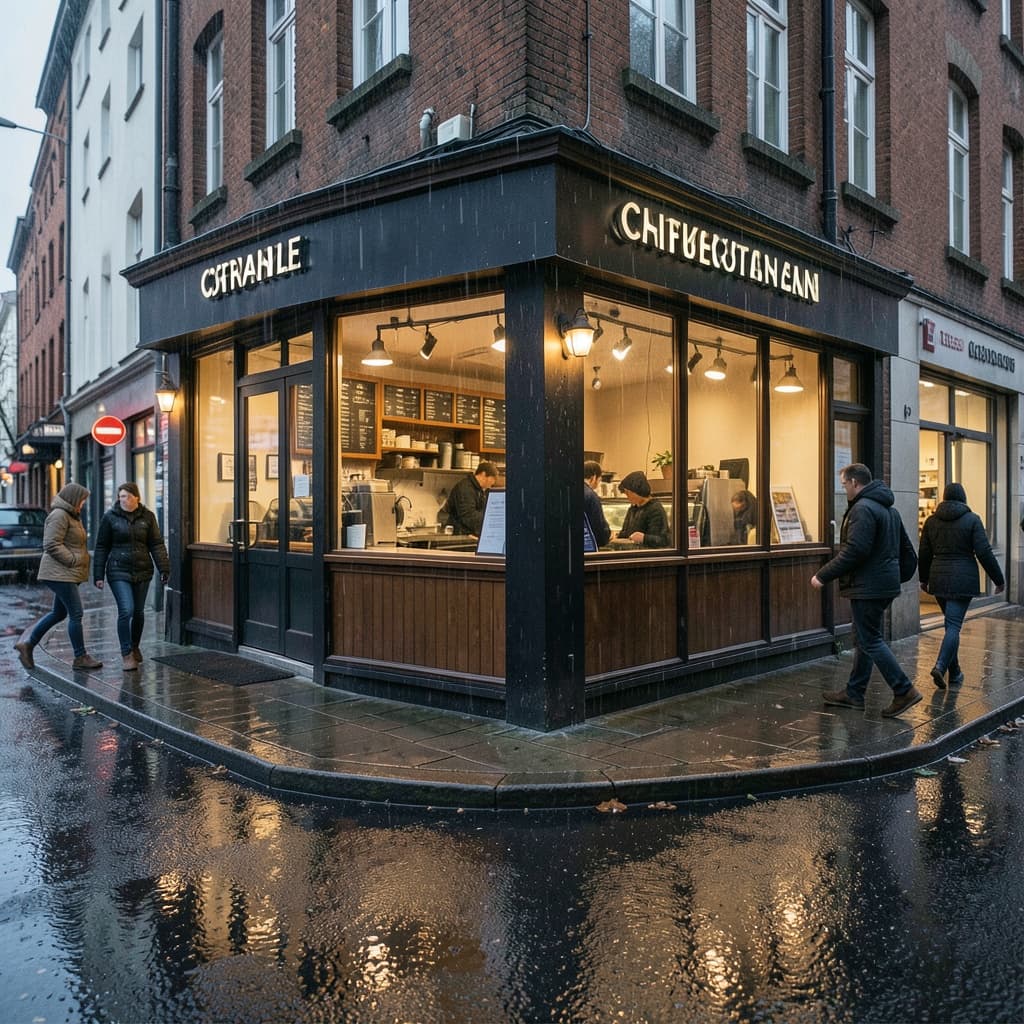
Both examples were generated through the exact WaveSpeed model used by the tool above and are served from this site.
Text to Image
A fast architectural concept with believable street detail and warm practical lighting.
Prompt
A compact Scandinavian coffee kiosk on a rainy city corner, warm interior light, wet pavement reflections, editorial architecture photography, realistic materials, subtle people in motion, 35mm lens
Image Edit
The edit keeps the kiosk and viewpoint while changing season, weather, and lighting.
Prompt
Transform the scene into a bright spring morning while preserving the kiosk architecture and camera angle; add soft cherry blossoms and natural daylight
01
Move from prompt to draft quickly
Explore compositions, moods, and campaign directions before spending more credits on final production.
02
Edit with up to three references
Change lighting, environments, and visual style while giving the model multiple images for context.
03
Scale routine creative work
A practical fit for social graphics, thumbnails, moodboards, and repeated visual experiments.
How it works
Create with FLUX.2 Klein 4B in three steps
1
Choose a mode
Start with Text to Image or upload one to three references for Image Edit.
2
Describe the result
Write a direct prompt that names the subject, style, composition, and the details that must stay unchanged.
3
Select quality and generate
Use Standard for quick drafts, then increase quality when the direction is ready.
FLUX.2 Klein is best for fast drafts, concept exploration, social visuals, and everyday edits where speed and low credit cost matter.
Yes. You can edit an existing image with natural-language instructions and provide up to three reference images.
Standard costs 1 credit, High costs 2 credits, and Ultra costs 3 credits for both Text to Image and Image Edit.
Standard supports up to 1024px, High up to 1280px, and Ultra up to 1536px on the longest edge.
FLUX.2 Klein 4B is the fastest model in the FLUX.2 family. Its smaller 4B parameter count means quicker generation, which makes it the best choice when you need many variations quickly or want to iterate on concepts without spending high credits.
Yes. FLUX.2 Klein runs entirely in your browser on this page. There is no app, plugin, or software to install — write a prompt or upload references and generate immediately.
Choose Klein for fast drafts, social graphics, and high-volume iteration at the lowest credit cost. Choose Pro when you need polished materials, realistic lighting, and production-ready detail. Many creators draft in Klein and finish in Pro.
Klein excels at fast concept art, social media graphics, moodboards, thumbnails, and everyday image edits. It is the most cost-effective FLUX.2 model for exploration and volume work where speed matters more than maximum fidelity.
Create your next image with FLUX.2 Klein 4B
Start from a prompt or upload references, choose the output quality, and generate directly on this page.